Tune Windows & Your Games.
Zero Bloat. Zero Placebo.
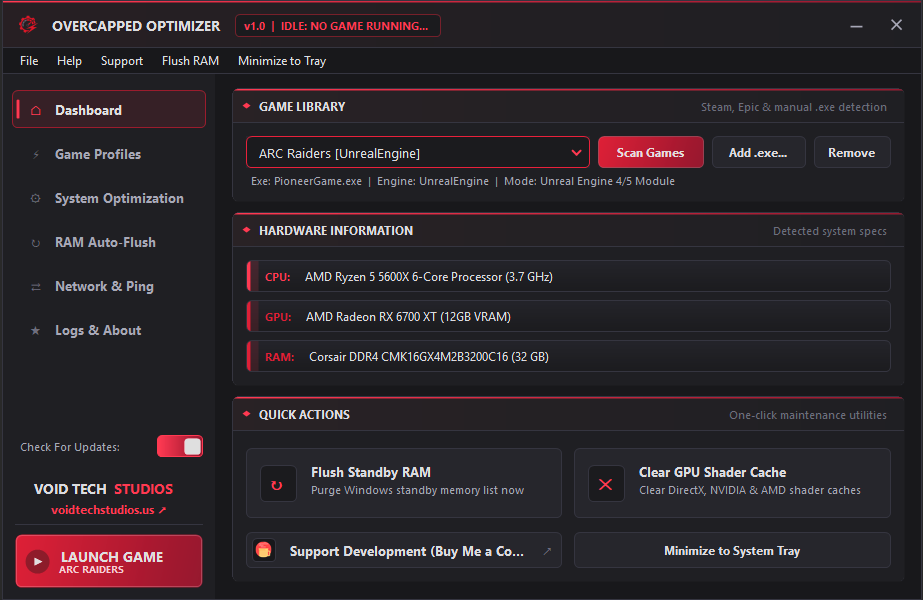
Overcapped handles the stuff that actually keeps your frames smooth, RAM flushing, auto power plans, Unreal Engine, Unity Engine & custom importable config profiles for any game, and a zero-injection FPS overlay.
Native Windows APIs, IFEO registry, and fps tracing only.
Steam/Epic auto-scan + custom JSON profile import & export.
Power plan, priorities & core masks reset when your game closes.
Open Source build under GPL-3.0.
Overcapped Features
Built around what actually causes stutters.
Game Auto Detect, Tuning & Custom Game Profiles
Auto-detects installed Steam and Epic titles (or any manual .exe), auto-tunes Unreal Engine 4 & 5 configs to your GPU VRAM, and lets you import or export custom JSON profile packs to add preset support for literally any game you play.
FPS & Frametime Overlay
Reads Windows DXGI & D3D frame events directly without touching game memory. Set custom opacity (5%–100%), pick a corner preset, or drag it anywhere on screen and right-click to lock and save its spot.
Borderless Windowed
Smart Standby RAM Flush
Stops late-session hitching when Windows standby RAM fills up. Smart Threshold Mode only purges when free physical RAM drops below your GB limit and standby cache is actually bloated, or run on a fixed timer.
Auto Power, Priority & Cores
Automatically switches to Ultimate/High Performance power, pins physical CPU cores, and throttles background browsers while any game in your library is running. Pairs with CPU High Priority and DXGI GPU binding.
Network Tools & Jitter Monitor
Kills Ethernet NIC power-saving (EEE) lag spikes, tags your active game's UDP traffic with DSCP 46 Expedited Forwarding, flushes DNS, and tests real server ping, jitter, and packet loss via UDP A2S or ICMP.
GPU Shader Cache Cleaner, Game Mode / FSO & Safe Backups
Wipe stale DirectX, NVIDIA, and AMD shader caches after driver updates, keep Windows Game Mode on while turning off Game DVR and Fullscreen Optimizations, and take timestamped config backups before touching any .ini or .cfg files.
EZ MODE
Up and running in under a minute.
Extract & Scan Your Library
Unzip anywhere and launch Overcapped Optimizer.exe. It scans your Steam and Epic installs automatically, or you can point it to any manual .exe.
Pick Optimizations or Import a Profile
Apply hardware-matched UE4/5 presets, import a custom JSON profile pack, turn on Smart RAM Auto-Flush, and toggle the FPS overlay if you want it.
Minimize to Tray & Play
Tuck it in the system tray. Power plans, background throttling, and core pinning kick in when your game starts up and reverts automatically when you close it.
Got a custom game profile or ran into a bug?
Jump into the Void Tech Studios Discord to share exported JSON profile packs, grab help setting up a game, or report issues directly to the dev.